
4(0.00)
the most probable value on a grid of 0 to 30with the probability of every value
- 2 0.01
- 3 0.07
- 4 0.84
- 5 0.07
- 6 0.01
number 4expected 4.00confidence 0.84your code sends the reminder for 4
A number question asks for one value on a grid you set. Above, a customer statement goes in as text and overdue comes back as 4 with probability 0.84, the full distribution over 0 to 30 below it. It is the fourth type, next to Choice, Score and Truth, and it is read the same way: a typed answer with probabilities you can threshold.
What it answers#
- Counts: cars in a drone frame, items on a shelf, pallets in a bay, overdue invoices in a statement, open findings in a report, steps in a plan another model wrote.
- Values read off the input: the year a contract was signed, the days until a deadline, the percentage of a page that is tables, a price in a stated range.
- Ratings and brackets: a review's rating out of ten in halves, an age bracket from a form, a severity from 1 to 5 when the levels are plain numbers.
Use a Score when each level has a meaning in words (routine, urgent, critical). Use a number when the answer is a quantity, and the values in between mean what they say.
Request#
{
  "cars": {
    "type": "number",
    "instructions": "How many cars are visible in the image?",
    "min": 0,
    "max": 50
  }
}type"number"required- The question type.
instructionsstring- What to count or read, in one sentence. The same field as on every type.
minnumberdefault0- The lowest value the answer can take.
maxnumberdefault255- The highest value, at least
min. stepnumberdefault1- The spacing of the grid, above 0:
1for whole numbers,0.5for halves,0.1for one decimal. The grid runs fromminin steps ofstepup to the last value at or belowmax.
A number question uses no criteria: the grid is the set of answers. A min, max or step that is not a number, min above max, a step of 0 or below, a min or step with more than 6 decimals, or a grid of more than 4,096 values is refused with a 422 whose detail list names the field (min, max, step or the grid), and nothing is charged. See Errors.
Response#
{
  "cars": {
    "type": "number",
    "number": 7,
    "expected": 7.0,
    "confidence": 0.78,
    "probabilities": { "5": 0.01, "6": 0.1, "7": 0.78, "8": 0.1, "9": 0.01 }
  }
}numbernumber- The most probable value of the grid. Always a value your grid allows, written as the grid writes it:
7on a whole-number grid,3.5on a grid of 0.5. Read it as a float in a typed client. expectednumber- The probability-weighted mean: a fractional estimate, even on a whole-number grid. A float rounded to 2 decimals, so a whole value prints with its decimal point (
7.0). confidencenumber- The probability of
number, from 0 to 1. probabilitiesobject- Every grid value whose probability is above 0.001, keyed by the value as a string (
"7","3.5"), each to 3 decimals: an exception to the 2-decimal rule of other answers. The list is sparse and is not corrected toward a sum of 1, so the listed values sum to at most 1, and less over a wide grid.
expected = sum(v · p_v)
confidence = p_number
- v
- a value of the grid
- p_v
- the probability of v
- p_number
- the probability of the most probable value
Keys are written the shortest way: "7", never "7.0"; "3.5", never "3.50". Parse them as numbers before you sort: in most languages an object keeps "10" ahead of "2.5".
On text#
A statement as an accounting system exports it, with two number questions and a Choice in one request. overdue counts the invoices past due on the statement date (4); oldest_days reads how late the oldest one is (78, expected 78.08); reminder picks what to send. Every answer comes from one read of the statement.
https://api.decisionnode.comCustomer statement
Account: Norrvik Supply AB (30-4471)
Statement date: 2026-10-01
Terms: net 30, amounts in EUR
Invoice Issued Due Amount Status
INV-2041 2026-06-15 2026-07-15 1,240.00 open
INV-2058 2026-07-03 2026-08-02 410.00 paid 2026-08-01
INV-2063 2026-07-21 2026-08-20 860.00 open
INV-2069 2026-07-29 2026-08-28 395.00 paid 2026-09-02
INV-2077 2026-08-06 2026-09-05 1,120.00 part paid, 300.00 open
INV-2081 2026-08-13 2026-09-12 640.00 open
INV-2090 2026-08-31 2026-09-30 780.00 paid 2026-09-29
INV-2094 2026-09-10 2026-10-10 520.00 open
INV-2102 2026-09-24 2026-10-24 915.00 openThe request carries that statement as its state, one JSON string. Below it reads as a placeholder so the questions stay in view; the copy button copies the full request, statement included, ready to run.
curl https://api.decisionnode.com/v1/decide \
  -H "Authorization: Bearer $DECISIONNODE_API_KEY" \
  -H "Content-Type: application/json" \
  -d '{
    "model": "decisionnode",
    "state": "<statement.txt, above>",
    "questions": {
      "overdue": {
        "type": "number",
        "instructions": "How many invoices on this statement are overdue on the statement date?",
        "min": 0,
        "max": 30
      },
      "oldest_days": {
        "type": "number",
        "instructions": "How many days past its due date is the oldest unpaid invoice?",
        "min": 0,
        "max": 180
      },
      "reminder": {
        "type": "choice",
        "instructions": "Which reminder should go out today?",
        "criteria": {
          "none": "nothing is overdue, send nothing",
          "friendly": "a friendly reminder for one recent invoice",
          "firm": "a firm reminder listing every overdue invoice",
          "final": "a final notice before the account is passed to collections"
        }
      }
    }
}'{
"model": "decisionnode-main-0.9.1-rc1",
"answers": {
"overdue": {
"type": "number",
"number": 4,
"expected": 4.0,
"confidence": 0.84,
"probabilities": {
"2": 0.01,
"3": 0.07,
"4": 0.84,
"5": 0.07,
"6": 0.01
}
},
"oldest_days": {
"type": "number",
"number": 78,
"expected": 78.08,
"confidence": 0.61,
"probabilities": {
"75": 0.01,
"76": 0.03,
"77": 0.13,
"78": 0.61,
"79": 0.14,
"80": 0.05,
"81": 0.02,
"82": 0.01
}
},
"reminder": {
"type": "choice",
"choice": "firm",
"confidence": 0.68,
"probabilities": {
"final": 0.19,
"firm": 0.76,
"friendly": 0.04,
"none": 0.01
}
}
},
"usage": {
"input_tokens": 445,
"output_tokens": 0,
"cost": {
"usd": 0.00001869,
"model_usd": 0.00001869,
"boosters_usd": 0,
"free_tier": false
}
}
}On an image#
images[0] "frame"
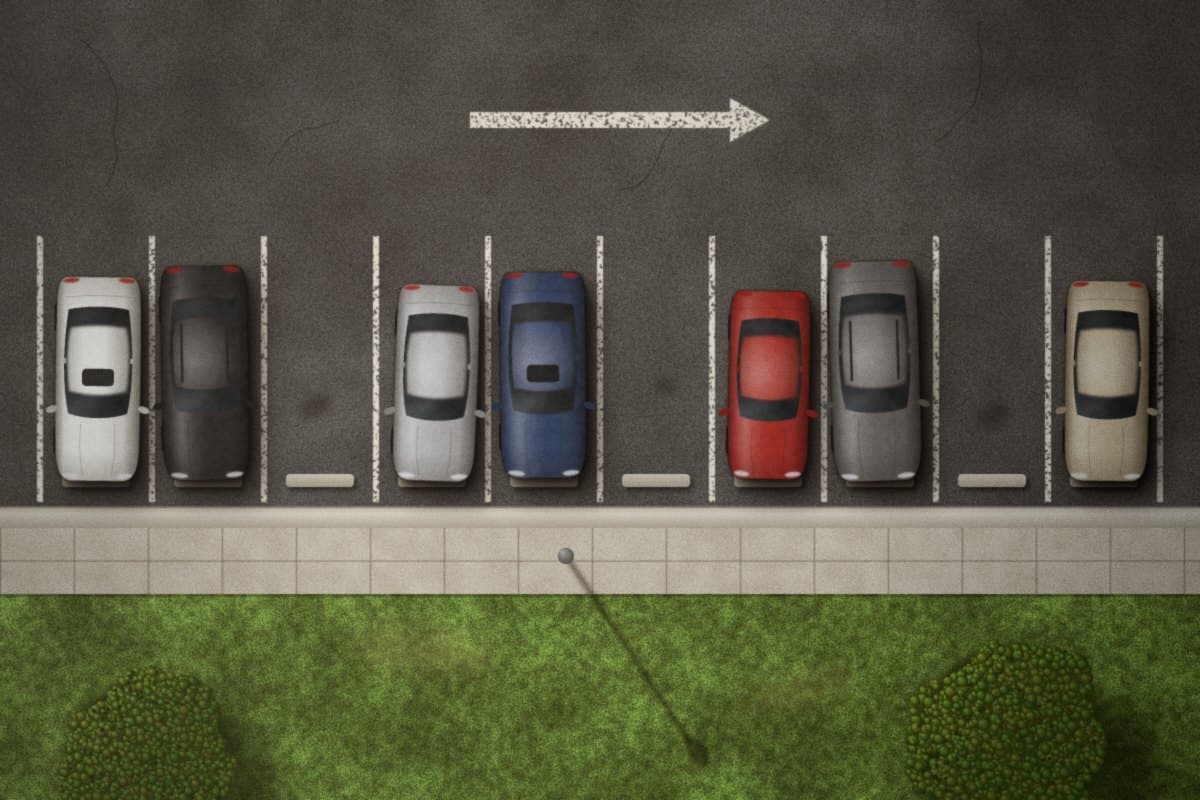
one read of the frame: the answer is the count and its distribution, not where each object is
state
Drone frame over row B4 of the north car park, camera pointing straight down.
question
cars How many cars are visible in the image?
input 328 tokensoutput 0, free
carsNumberexpected 7.00
7(0.00)
- 5 0.01
- 6 0.10
- 7 0.78
- 8 0.10
- 9 0.01
your code logs 7 cars at confidence 0.70 or more
The frame goes in images, the question asks for a count on a 0 to 50 grid, and the answer is a number your code can store, compare or act on. DecisionNode reads the image itself, in the same pass as the state and the question: there is no caption step in between.
https://api.decisionnode.comcurl https://api.decisionnode.com/v1/decide \
-H "Authorization: Bearer $DECISIONNODE_API_KEY" \
-H "Content-Type: application/json" \
-d '{
"model": "decisionnode",
"state": "Drone frame over row B4 of the north car park, camera pointing straight down.",
"images": [
{ "id": "frame", "media_type": "image/jpeg", "data": "<base64>" }
],
"questions": {
"cars": {
"type": "number",
"instructions": "How many cars are visible in the image?",
"min": 0,
"max": 50
}
}
}'The grid#
min, max and step set every value the answer can take. Without them the grid is 0 to 255 in whole numbers. A grid of up to 256 values is answered as one question. A finer or wider grid is composed inside the same call, and you still get one answer. A grid holds at most 4,096 values in all: 0 to 1000 at step 0.1 (10,001 values) is refused with 422, so narrow the range or widen the step.
| Grid | Request | Values | Answered as |
|---|---|---|---|
| Cars in a frame | "min": 0, "max": 50 | 51 | One question |
| Year a contract was signed | "min": 1990, "max": 2026 | 37 | One question |
| Default range | no min, max or step | 256 | One question |
| Rating in halves | "min": 0, "max": 5, "step": 0.5 | 11 | One question |
| Percentage, one decimal | "min": 0, "max": 100, "step": 0.1 | 1,001 | Composed in the same call |
| Price in a stated range | "min": 0, "max": 2000, "step": 5 | 401 | Composed in the same call |
A composed grid answers like any other: number is a value of your grid, expected and confidence mean the same, and probabilities lists every grid value above 0.001, to 3 decimals. Keys follow your step: "42.5" on a grid of 0.1, "1995" on a grid of 5. A tight range is still worth setting: the fewer values, the less a question costs and the sharper the distribution. See Errors for a grid that cannot be built.
Reading the answer#
- Act on
numberwhenconfidenceclears the bar you set for this question. The frame above, 7 at 0.78, is a count your code can log, bill or route on. - Use
expectedwhere a fractional estimate is better than a whole one: averages across many frames, forecasts, sorting. - Read
probabilitiesfor the shape. A split answer, "probably 7, maybe 8", looks like{"6": 0.21, "7": 0.62, "8": 0.14}:numberis 7 at 0.62, and adding its neighbours gives 0.97, the chance the true value is within one.
"Probably 7, maybe 8" never waits on anyone. Below your bar, your code escalates on its own: it re-checks with DecisionNode when the first call went to DecisionNode Flash, and if the answer is still split it takes the safe end of what is likely, such as planning for 8 cars rather than 7.
# decide(request) posts the request to /v1/decide and returns its answers
ACT_AT = 0.7   # per question, in config

def count_cars(request):
    cars = decide({**request, "model": "decisionnode-flash"})["cars"]
    if cars["confidence"] < ACT_AT:     # probably 7, maybe 8: ask the full model
        cars = decide({**request, "model": "decisionnode"})["cars"]
    if cars["confidence"] >= ACT_AT:
        return cars["number"]           # sure: act on it

    # still split: take the high end of the likely values, automatically
    likely = [float(v) for v, p in cars["probabilities"].items() if p >= 0.1]
    # nothing reaches 0.1 (a wide, flat spread): the most probable value
    return int(max(likely, default=cars["number"]))  # a whole-number grid: an int
Beyond counting#
- Traffic and areas: cars passing a junction, people in a square, vehicles in a yard, from a camera frame or from video frames.
- Retail and logistics: items on a shelf, pallets in a bay, products on a line, from one camera frame.
- Documents: overdue invoices in a statement, open findings in an audit report, mentions of a product in a thread.
- Agriculture and inspection: fruit on a branch, defects on a surface, animals in a pen.
- Checks on other models: how many steps a generated plan has, how many sources an answer cites.
- Values, not counts: the year a document was issued, a percentage to one decimal, a price in a stated range, a rating in halves.
Billing#
A number question is billed like a choice with one option per grid value: a 0 to 50 count like a choice of 51 options. A grid of more than 256 values is composed in the same call: it is cut into the fewest equal pages of at most 256 values (300 values make two pages of 150), one choice picks the page and one choice per page picks the value within it. It is billed for every question it is composed of, the page choice and every page, so a wider or finer grid costs more: set the tightest range you can. The response's usage.input_tokens is always the exact figure. Image tokens are priced as on every call, and batch jobs take number questions at their lower price, like every other type. Output stays free. See Pricing and billing.